
Scheduling posts on Instagram has become a must-have strategy for creators, influencers, and business owners in 2025. With increasing competition, brands must stay consistent, organized, and ahead of their posting schedule. Luckily, Instagram now offers free built-in scheduling features, and third-party tools like Planable and Meta Business Suite provide professional-level scheduling options at no cost. Whether you’re managing one account or multiple profiles, scheduling helps you save time, plan content better, and improve engagement.
This guide will explain every free method to schedule posts on Instagram—including Posts, Reels, Carousels, and even Stories (via Planable). You will learn step-by-step instructions, important limitations, and tips to manage professional accounts effortlessly. The best part? All the tools covered here are 100% free, beginner-friendly, and work globally.
By the end of this article, you will know exactly how to schedule posts using Instagram’s built-in option, how to use Planable for multiple accounts, and how to use Meta Business Suite for advanced scheduling across both Facebook and Instagram.
Why You Should Schedule Instagram Posts in 2025
Scheduling Instagram posts is not just for big brands—it’s essential for anyone who wants consistent engagement. Posting regularly boosts visibility across the platform, helps your followers interact with you, and ensures you never miss the best posting times. Whether you’re a creator, influencer, or business owner, scheduling content in advance lets you focus more on creativity rather than manual posting.
Scheduling also helps you avoid last-minute stress. You no longer need to remember posting times or upload content manually during busy hours. Everything happens automatically, giving you more time for analytics, content planning, and community interaction. This is especially helpful for creators posting daily Reels or businesses running frequent product promotions.
Instagram’s algorithm also favors accounts that post consistently. With scheduled content, you stay active even when you’re offline or traveling. This improves reach, boosts growth, and builds better engagement with your audience.
Method 1: Scheduling Posts on Instagram Using the Instagram App (Built-in)
Instagram now offers its own scheduling tool directly inside the app. This is the easiest and most reliable method if you have a Professional or Business account. You can schedule up to 25 posts per day and plan content up to 75 days ahead.
This feature supports:
- Photo posts
- Carousels
- Reels
- Posts with basic editing and filters
However, the built-in scheduler doesn’t support certain features like product tagging, collab posts, or fundraisers. But for regular posts and Reels, it’s perfect.
To use the scheduling option, ensure your account is switched to Professional or Business mode. Only then the feature becomes available under Advanced Settings.

Steps to Schedule Posts or Reels on Instagram
Follow these simple steps:
- Open the Instagram app and tap the Create (+) button.
- Choose Post or Reel and upload your photo or video.
- Add captions, hashtags, filters, effects, or location details.
- Scroll down and tap Advanced Settings (iOS) or More Options (Android).
- Toggle the Schedule this post button.
- Choose a date and time within the next 75 days.
- Tap Done, go back, and hit Schedule.
Once scheduled, the post will automatically publish at the selected time.
Important Limitations When Scheduling Inside Instagram
- Product tagging is not allowed.
- You cannot schedule collab posts.
- Audience settings remain the same at publishing.
- Changing account type or removing links may stop the post from publishing.
- Cross-posting settings cannot be modified once scheduled.
Despite these limitations, Instagram’s native scheduler is excellent for quick and simple scheduling needs.
How to Manage Scheduled Posts on Instagram
Instagram also provides a dedicated section to manage all your scheduled content. You can review, edit, or reschedule posts easily.
To manage scheduled posts:
- Go to your Profile.
- Tap Menu (☰) on the top right.
- Select Scheduled Content.
- Choose a post to view options like:
- Reschedule
- Edit
- Share Now
- Delete
You can also view scheduled posts via:
Create (+) → Post/Reel → Scheduled.
This makes managing your upcoming content simple and organized.
Method 2: Scheduling Instagram Posts for Free Using Planable
If you want a more advanced tool with features for multiple accounts, team workflows, and recurring posts—Planable is the best free option. Unlike the Instagram app, Planable supports scheduling Stories, Carousels, Reels, and Feed posts with more control and customization.
Planable supports platforms like:
- YouTube
- TikTok
- Threads
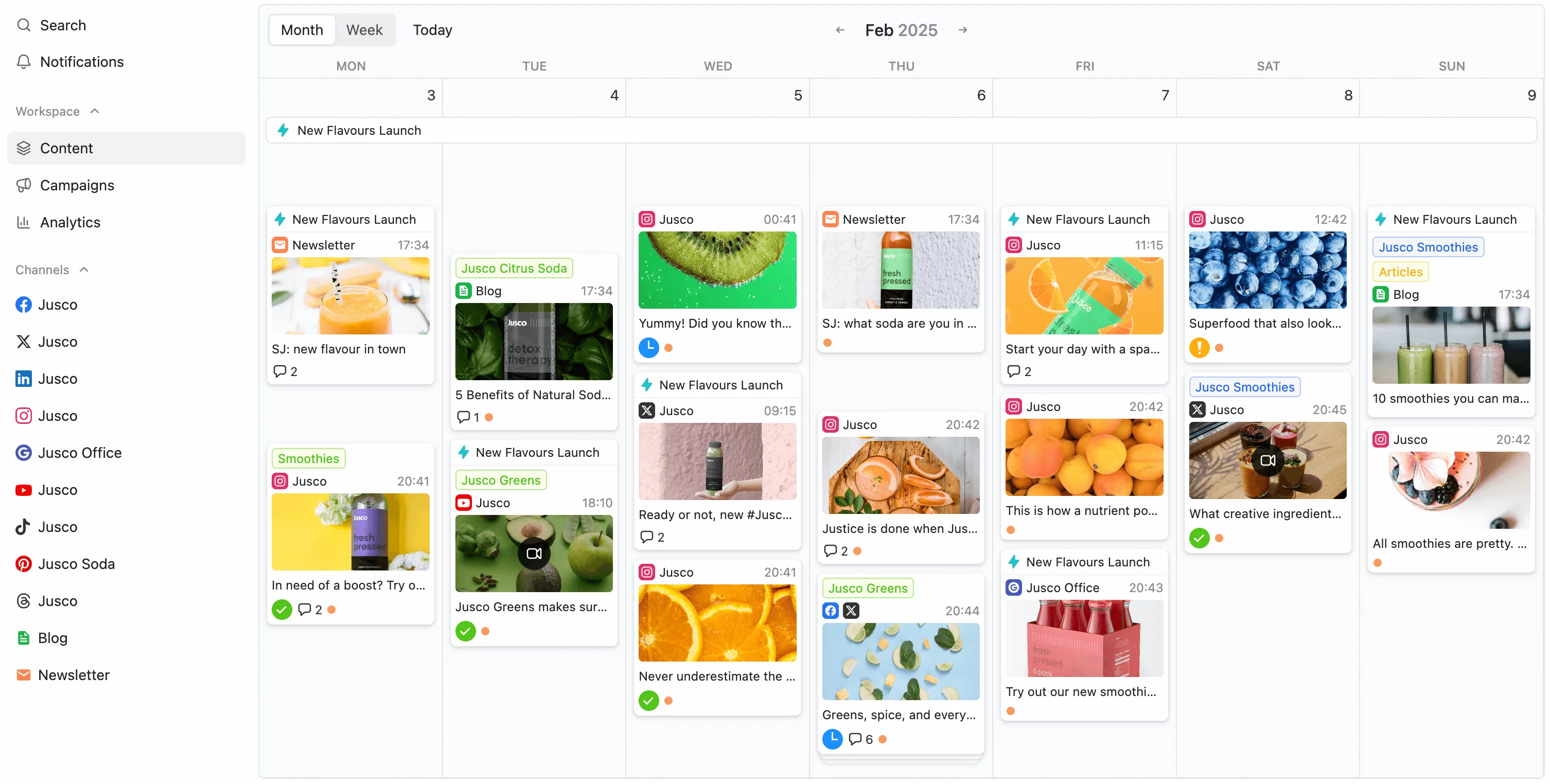
Its interface is clean, fast, and perfect for social media managers who need to plan content visually in feed or calendar view.
With Planable, you can also collaborate with team members, assign approvals, and organize multiple clients in one dashboard.
Steps to Schedule Posts on Planable
- Create a free Planable account (no credit card needed).
- Connect your Instagram Professional Account directly or through Facebook.
- Click Compose to create a new post.
- Add photos, videos, GIFs, or carousels.
- Write captions and hashtags.
- Add labels and categories for better organization.
- Schedule the first comment if needed.
- Select the date and time.
- Click Schedule.
Planable will publish the post at your chosen time without any manual work.
Extra Features You Get in Planable
- Schedule recurring posts (daily/weekly/monthly)
- Four viewing modes: Calendar, Feed, Grid, List
- Team collaboration with approval workflows
- Automatic publishing for approved content
- AI caption assistant
- Multiple accounts management
- Instagram Stories scheduling
This tool is ideal for agencies, creators with multiple pages, and businesses with high content volume.
Method 3: Scheduling Instagram Posts Using Meta Business Suite
Meta Business Suite is a powerful free tool from Facebook. It allows you to manage both your Instagram and Facebook accounts from one dashboard. If you want to post on both platforms simultaneously, this is the best option.
It comes with advanced options like:
- Hashtag suggestions
- Audience targeting
- Cross-platform scheduling
- Analytics and insights
- Post performance tracking
Business Suite also provides a clean calendar view, making it easy to plan your content for weeks or months ahead.
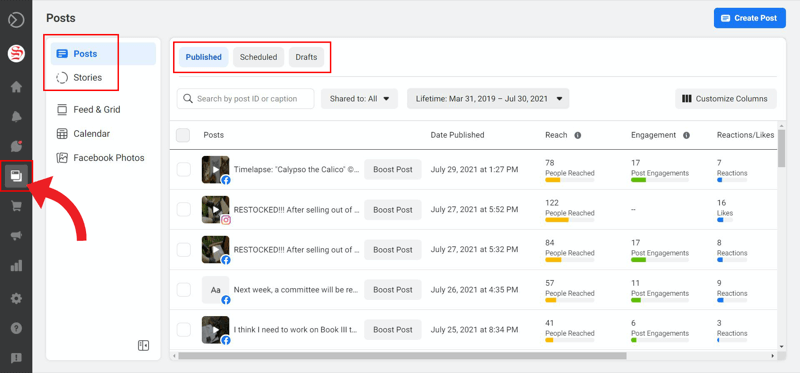
Steps to Schedule Instagram Posts Using Meta Business Suite
- Open your Facebook Page.
- Click Meta Business Suite from the left panel.
- Go to Home, Content, or Planner.
- Click Create Post.
- Select Instagram, or both Instagram + Facebook.
- Upload photos or videos.
- Add captions, hashtags, mentions, and links.
- Enable Set Date & Time.
- Click Schedule.
Your post will be automatically published at the chosen time.
Why Meta Business Suite Is Useful
- Manage Facebook and Instagram in one place
- Schedule large volumes of posts
- Useful for professional teams
- View detailed analytics and insights
- Create and monitor Reels, posts, and ads
For businesses or creators handling multiple platforms, this tool offers more control than the Instagram app.
Benefits of Scheduling Instagram Posts in 2025
1. Saves Time
You can prepare a week or month of content at once.
2. Improves Consistency
Posting regularly boosts impressions and engagement.
3. Better Content Quality
You get more time to plan captions, hashtags, and visuals.
4. Perfect Posting Times
Scheduling ensures posts go live when your audience is active.
5. Stress-Free Social Media Management
No need to upload content manually every day.
6. Works Best for Influencers & Businesses
Promotions, product launches, and campaigns become more organized.
Whether you’re a beginner or a professional, scheduling improves your content strategy and helps you grow faster.
Final Thoughts
Scheduling Instagram posts for free is easier than ever in 2025. Whether you use the built-in Instagram app, Planable, or Meta Business Suite, all three methods help creators and businesses stay consistent. The Instagram app is best for quick scheduling, Planable is perfect for multiple accounts and team workflows, and Business Suite is ideal for managing Facebook and Instagram together.
Scheduling your posts will save time, reduce stress, and help you focus more on creating high-quality content. With these tools, everyone—from beginners to professionals—can stay organized and grow their online presence worldwide.