
The Pixel Watch 3 introduces one of Google’s most advanced safety features ever — Loss of Pulse Detection. This feature monitors your pulse 24/7 and automatically alerts emergency services if it detects that your heart has stopped beating. It is designed to help in life-threatening conditions such as cardiac arrest, severe breathing failure, or sudden collapse.
Google has engineered this system using advanced heart-rate sensors, machine learning algorithms, and motion data to detect the absence of a pulse even when the user is unconscious. For people who live alone, have medical risks, or want additional safety protection, Loss of Pulse Detection adds a strong security layer.
This feature works silently in the background and activates itself whenever it detects no heart activity. It tries to get your attention with vibrations and sounds, but if you do not respond within the countdown, it automatically contacts emergency services and shares your location.
How Loss of Pulse Detection Works on Pixel Watch 3
Loss of Pulse Detection constantly reads your pulse using advanced optical sensors. Unlike normal heart-rate monitoring, this system uses a high-precision algorithm designed to detect complete pulse absence rather than just irregular beats. This makes it extremely useful for emergencies such as sudden cardiac arrest.
When your Pixel Watch 3 cannot detect a pulse, it triggers a multi-step sequence to verify the situation. The watch first vibrates to check if you are awake or responsive. If you ignore the vibration, the watch plays a loud warning tone to grab your attention. This continues for several seconds.
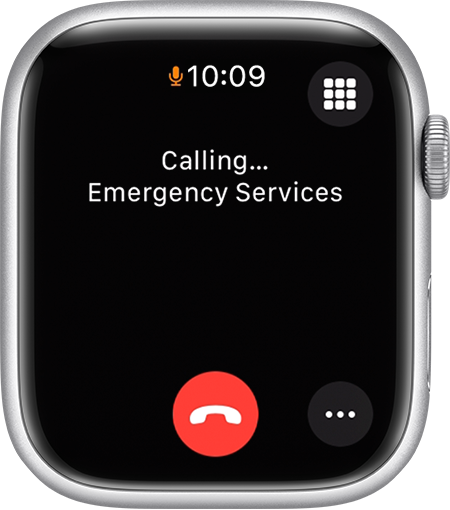
If there is still no movement or cancellation, the watch starts a countdown on the screen. You can stop the alert by tapping “X” on the screen. But if you fail to respond before the countdown ends, your Pixel Watch 3 will contact emergency services automatically. It shares your exact location and a pre-recorded message that says your pulse was not detected.

Countries Where the Feature Is Available
Loss of Pulse Detection received FDA clearance in the United States, meaning it is officially approved for medical-grade safety situations. Apart from the U.S., this feature is available in:
- Austria
- Belgium
- Denmark
- France
- Germany
- Ireland
- Italy
- Netherlands
- Norway
- Portugal
- Spain
- Sweden
- Switzerland
- United Kingdom
Google confirmed that more countries will receive this feature gradually as regulatory approval expands.
This rollout indicates that Google aims to position Pixel Watch 3 not only as a fitness device but as a critical personal safety tool. Users in approved regions can activate the feature immediately through the Pixel Watch app.
How to Enable Loss of Pulse Detection on Pixel Watch 3
Setting up this feature is very easy and takes just a few minutes. Make sure your Pixel Watch is connected to your phone and the Pixel Watch app is updated to the latest version. Then follow these steps:
- Open the Pixel Watch app on your connected phone.
- Tap Safety & Emergency.
- Select Loss of Pulse Detection.
- Sign in to your Google Account (Personal Safety setup).
- Tap Set up, then Continue.
- Enter your date of birth — this feature only works for users aged 22+.
- Review the eligibility requirements and tap Continue.
- Complete the How it works page.
- Review the data handling information.
- At the final Things to remember page, tap Turn on.
Once activated, the watch starts monitoring your pulse continuously in the background. The sensors stay active as long as the device is touching your skin.
The watch can trigger an alert if you’re completely still, unconscious, or suddenly lose pulse activity. You can cancel the alert manually at any time before the emergency call is made.

When Does Loss of Pulse Detection Activate?
The feature activates when:
- No pulse is detected for a specific period
- You are unresponsive to vibrations
- You do not react to the loud warning sound
- You fail to cancel the countdown timer
It will not activate during:
- Active phone calls
- When the watch is not touching your skin
- When the band is extremely loose
- If the battery level is critically low
- If you manually switch it off
The system uses motion sensors, pulse sensors, and machine learning to avoid false alarms. Still, if it mistakenly triggers, simply tap the cancel icon.
The entire mechanism is designed to ensure emergency services receive accurate information only when truly needed.

Important Things to Know Before Using This Feature
Before using Loss of Pulse Detection, keep these points in mind:
- Works only on Pixel Watch 3
- You must be 22+ years old
- Requires Google Personal Safety sign-in
- Needs Bluetooth or LTE for emergency calling
- Not designed for those at high risk of sudden cardiac arrest
- Not a replacement for professional medical equipment
Some users may see false alerts if the watch is very loose, if your skin is too dry, or if the sensor loses contact during heavy movement. Google recommends wearing the band snugly but comfortably for best accuracy.
The feature is meant for unexpected emergencies, not for continuous medical monitoring—this is very important for users with serious medical conditions.
How Emergency Services Are Notified
If the watch detects no pulse and you don’t respond to alerts, it automatically begins the final step — contacting emergency services.
Here’s what happens:
- The watch sends an automated emergency message.
- It shares your exact GPS location.
- The message explains that no pulse was detected.
- Emergency services dispatch help immediately.
- If enabled, your emergency contacts are also informed.
Google engineered this to work even if you are unconscious. This feature can literally save lives by ensuring immediate response during critical moments such as cardiac arrest, overdose, or a sudden collapse.
Why Pixel Watch 3’s Loss of Pulse Detection Is a Game-Changer
Most smartwatches today can detect abnormal heart rates, but very few can recognize a complete loss of pulse. Google’s implementation brings medical-level safety into a simple wearable device.
Here’s why it’s revolutionary:
- It detects conditions that traditional heart-rate monitors cannot
- It alerts emergency responders automatically
- It works silently in the background
- It increases safety for people who live alone
- It helps in sudden medical emergencies
For elderly users, night-shift workers, athletes, or anyone with a history of fainting spells, this feature can make a massive difference. The watch becomes not just a fitness tracker, but a lifeline on your wrist.
Common Mistakes Users Make (And How to Avoid Them)
Many users accidentally disable or misuse this feature. Here are common mistakes:
1. Wearing the watch too loosely
If the sensor loses skin contact, you may get false warnings.
2. Turning off Personal Safety app permissions
This may disable automatic emergency calling.
3. Ignoring software updates
Pixel Watch updates often improve detection accuracy.
4. Not enabling LTE or Bluetooth
The watch cannot call emergency services without a connection.
5. Using it as a medical device
It is a safety feature, not a professional heart monitor.
Following Google’s recommendations ensures the feature works properly and reliably.
Final Words
The Loss of Pulse Detection feature on the Pixel Watch 3 is one of the most significant advancements in wearable safety technology. It can detect life-threatening situations, notify emergency responders, and potentially save your life even if you are unconscious or unable to call for help.
With continuous monitoring, smart alerts, and automatic emergency calling, this feature elevates the Pixel Watch 3 from a standard smartwatch to a powerful health and safety companion. Keeping it activated ensures round-the-clock protection and peace of mind.
If